Mozilla has just announced the release of Mozilla Firefox 3.6.3. It only fixed a critical security flaw that could potentially allow remote code execution (see bug 555109).
The memory corruption flaw, demonstrated by Nils of MWR Infosecurity at Pwn2Own 2010, is caused by moving DOM nodes between documents and triggering garbage collection at the right time, leaving an incorrectly retained node which would be used later. This, in turn, could be used to execute remotely injected code. Mozilla say the exploit only affects Firefox 3.6, but that it plans to patch Firefox 3.5 in a coming release "just in case there is an alternate way of triggering the bug".
There are no other changes in Firefox 3.6.3.
Friday, April 2, 2010


Wednesday, February 17, 2010
KDE 4.4 is ready for Mandriva
Run one of these to add KDE-4.4.0 repo (depending on your OS of course):
32 bits:
32 bits:
urpmi.addmedia kde-4.4.0 ftp://ftp.kde.org/pub/kde/stable/4.4.0/Mandriva/2010.0/i586
64 bits:
Credit goes to Juan Luis Baptiste for the info.
64 bits:
urpmi.addmedia kde-4.4.0 ftp://ftp.kde.org/pub/kde/stable/4.4.0/Mandriva/2010.0/x86_64
After adding the KDE 4.4. repository you will need to update, download and install all of KDE 4.4 packages. You can do all of this in one command, but, I, for safety, prefer to do it in two steps. First, update the repositories and download all the packages before installing them to make sure that the installation is possible:
urpmi --auto-update --auto-select --test
When all packages finish downloading and you see a message at the end saying that the installation is possible, you can run the same command without the --test parameter to now actually perform the installation:
urpmi --auto-update --auto-select
After the package installation finishes, logout and log back in, that's it !! you will have a brand new, shiny, awesome and rocking KDE 4.4 desktop :D
Enjoy!!
Enjoy!!
Credit goes to Juan Luis Baptiste for the info.
Friday, January 22, 2010
originalip option in dansguardian
I upgraded my firewall on Mandriva 2009.1 to 2010 and got into problem with dansguardian. Client computers got DansGuardian 400 - Bad Request , url is malformed for certain sites such as google and facebook. I suspected it must be related to new option introduced by newly installed dansguardian (2.10.1.1). In changelog, I got this:
Jan 21 17:18:39 firewall6 dansguardian[1090]: Destination host of dnl-15.geo.kaspersky.com did not match the original destination IP of 95.211.85.42
Jan 21 17:18:40 firewall6 dansguardian[1111]: Destination host of www.google-analytics.com did not match the original destination IP of 72.14.213.113
Jan 21 17:18:40 firewall6 dansguardian[1074]: Destination host of us.bc.yahoo.com did not match the original destination IP of 216.252.124.30
Jan 21 17:18:40 firewall6 dansguardian[1072]: Destination host of dnl-11.geo.kaspersky.com did not match the original destination IP of 38.117.98.202
Jan 21 17:18:41 firewall6 dansguardian[1091]: Destination host of dnl-04.geo.kaspersky.com did not match the original destination IP of 38.117.98.199
Jan 21 17:18:42 firewall6 dansguardian[1083]: Destination host of dnl-07.geo.kaspersky.com did not match the original destination IP of 38.117.98.199
Jan 21 17:18:42 firewall6 dansguardian[1116]: Destination host of newsrss.bbc.co.uk did not match the original destination IP of 212.58.226.73
Jan 21 17:18:43 firewall6 dansguardian[1076]: Destination host of dnl-11.geo.kaspersky.com did not match the original destination IP of 38.117.98.202
Jan 21 17:18:43 firewall6 dansguardian[1086]: Destination host of dnl-02.geo.kaspersky.com did not match the original destination IP of 38.117.98.196
Jan 21 17:18:49 firewall6 dansguardian[1270]: Started sucessfully.
After diff'ing between previous dansguardian.conf (currently in use) and the current version of the file (not in use). It turned out that originalip option was the culprit. It was on by default if it wasn't in there. To turn it off, I must tell it off as below:
Jan 21 17:18:39 firewall6 dansguardian[1090]: Destination host of dnl-15.geo.kaspersky.com did not match the original destination IP of 95.211.85.42
Jan 21 17:18:40 firewall6 dansguardian[1111]: Destination host of www.google-analytics.com did not match the original destination IP of 72.14.213.113
Jan 21 17:18:40 firewall6 dansguardian[1074]: Destination host of us.bc.yahoo.com did not match the original destination IP of 216.252.124.30
Jan 21 17:18:40 firewall6 dansguardian[1072]: Destination host of dnl-11.geo.kaspersky.com did not match the original destination IP of 38.117.98.202
Jan 21 17:18:41 firewall6 dansguardian[1091]: Destination host of dnl-04.geo.kaspersky.com did not match the original destination IP of 38.117.98.199
Jan 21 17:18:42 firewall6 dansguardian[1083]: Destination host of dnl-07.geo.kaspersky.com did not match the original destination IP of 38.117.98.199
Jan 21 17:18:42 firewall6 dansguardian[1116]: Destination host of newsrss.bbc.co.uk did not match the original destination IP of 212.58.226.73
Jan 21 17:18:43 firewall6 dansguardian[1076]: Destination host of dnl-11.geo.kaspersky.com did not match the original destination IP of 38.117.98.202
Jan 21 17:18:43 firewall6 dansguardian[1086]: Destination host of dnl-02.geo.kaspersky.com did not match the original destination IP of 38.117.98.196
Jan 21 17:18:49 firewall6 dansguardian[1270]: Started sucessfully.
After diff'ing between previous dansguardian.conf (currently in use) and the current version of the file (not in use). It turned out that originalip option was the culprit. It was on by default if it wasn't in there. To turn it off, I must tell it off as below:
# Network Settings
#
# the IP that DansGuardian listens on. If left blank DansGuardian will
# listen on all IPs. That would include all NICs, loopback, modem, etc.
# Normally you would have your firewall protecting this, but if you want
# you can limit it to a certain IP. To bind to multiple interfaces,
# specify each IP on an individual filterip line.
filterip = 192.168.6.6
# the port that DansGuardian listens to.
filterport = 8080
# the ip of the proxy (default is the loopback - i.e. this server)
proxyip = 127.0.0.1
# the port DansGuardian connects to proxy on
proxyport = 3128
originalip = off
This is what changelog says about originalip option:
Fri 5th June 2009 - DansGuardian 2.10.1.1 - stable
Add "originalip" option to dansguardian.conf, for determining the original destination IP in transparent proxy set-ups, and ensuring that the destination domain of the request resolves to that IP. This can help to address a particular transparent proxy security vulnerability (US-CERT VU#435052), but because of certain limitations - only implemented on Linux/Netfilter; potential breakage of websites using round-robin DNS - the code is not enabled by default. Enable by passing "--enable-orig-ip" to the configure script. Fix a crash which could occur when dealing with simultaneous incoming connections in configurations using more than one listening socket. Fix a crash when checking time limits on item lists. Fix potential usage of uninitialised memory during phrase filtering.
Luckily, Mandriva package was built with --enable-orig-ip enabled.
Cheers.
Wednesday, January 20, 2010
Stripping comments from a file
You can run this command to strip comments (line starting with a #) and empty lines from a file in Linux:
I usually run this command on squid.conf, a file heavily commented.
To save the lines to file squiD.conf, you can run:
Have fun!...
cat /etc/squid/squid.conf | grep -v ^# | grep -v ^$
I usually run this command on squid.conf, a file heavily commented.
To save the lines to file squiD.conf, you can run:
cat /etc/squid/squid.conf | grep -v ^# | grep -v ^$ > squiD.conf
Have fun!...
Saturday, January 9, 2010
Nat Friedman leaves Novell

Nat Friedman and Miguel de Icaza were the founders of Ximian project. They both were known for their famous GNOME project where Ximian bornt. You can read what Nat will do next in his blog.
Thursday, December 17, 2009
We are using MySQL, help save it
As Oracle are progressing to acquire Sun, the future of MySQL is at stake. Read Monty's article about this at http://monty-says.blogspot.com/2009/12/help-saving-mysql.html to understand this issue better.
Sunday, December 6, 2009
How to change KDE 4 startup sound
It may not obvious for beginner. These are the steps on how to change startup sound in KDE 4.
1. Open KDE System Setting
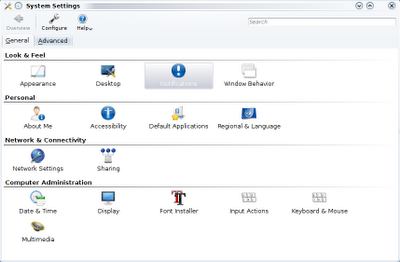
2. Double click on the notifications to open it.
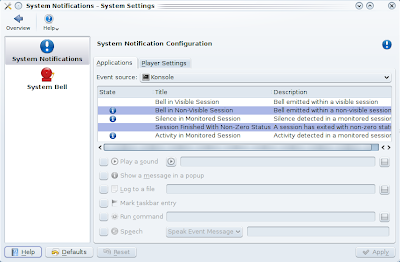
3. For Event source, select KDE System Notifications as below.
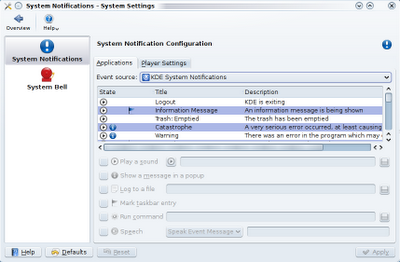
4. From the list, select Login and click browse button to change the sound file.
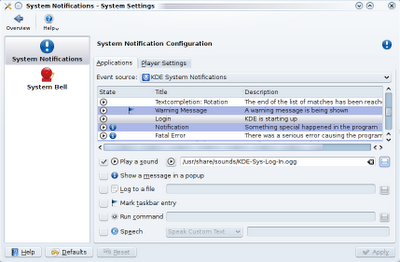
From here, there are lots of options for you to try. Have fun!
1. Open KDE System Setting

2. Double click on the notifications to open it.

3. For Event source, select KDE System Notifications as below.

4. From the list, select Login and click browse button to change the sound file.

From here, there are lots of options for you to try. Have fun!
Subscribe to:
Posts (Atom)
-
 queuegraph is a very simple mail statistics RRDtool frontend for Postfix that produces daily, weekly, monthly and yearly graphs of Postfix...
 -
BASH script to load balance 2 WAN links. #!/bin/bash # # bal_local Load-balance internet connection over two local links # # Version: 1....
-
Recently, my server's only hard disk was almost full. I bought a new hard disk with bigger size and I decided to just add it as a second...